
First mentions about AI
When computer scientists first talked about AI in the 1950s and 1960s, they weren’t thinking about graphic design; they were thinking about logic and problem solving.
The 1956 Dartmouth Workshop framed artificial intelligence as getting machines to handle tasks like theorem‑proving and game playing using symbolic representations and search.
Design entered the conversation when researchers started to ask:
Can creative work be described in similar terms?
Early theorists like Herbert A. Simon saw design as a giant puzzle. Instead of trying to find one perfect, mathematical answer, a designer's job is simply to find a solution that checks all the required boxes. Even as later experts highlighted the unique creative intuition designers use, they still agreed on one thing: design is a highly structured, trial-and-error loop of working within strict limits.
The first major bridge from theory to practice was computer‑aided design (CAD).
- Sketchpad (1963): Showed that a computer could store and manipulate drawings with constraints, letting designers specify relationships between lines and shapes that the machine would maintain.
- AutoCAD (1982): Brought CAD into mass commercial practice.
What changed is not that AI “designed” things, but that design became a dialogue with software: you no longer only push lines on paper, you manipulate structures that obey rules.
From the late 1980s into the 2000s, researchers and some companies experimented with expert systems and configurators for design, like early parametric features in SolidWorks. These systems captured domain rules and enforced them when users specified options. Designers remained responsible for intent and taste; systems limited errors and explored variants.
This early history matters because it shows a recurring division of labor. The software is good at searching spaces; humans are good at defining what matters and what counts as “good enough” or “on‑brand.” Every later wave of AI in design repeats that pattern.
Machine learning enters
The next shift came less from new design theories and more from advances in pattern recognition. Advanced AI models designed to process visual data turned image enhancements into problems that software could tackle at scale.
By the mid‑2010s, image and interface tools embedded machine learning in features that looked like small quality‑of‑life improvements.
- Adobe Photoshop: Object selection went from manual work with the lasso tool to one‑click subject selection. Content‑aware fill and inpainting tools made it trivial to remove unwanted elements and reconstruct backgrounds.
On the surface, these changes looked incremental. Underneath, they were the first time many designers experienced tools that inferred structure from pixels and did something useful with it. They also introduced a subtle but important shift in trust.
People begain to expect that AI tools "understood" their content
Around the same time, recommendation systems in platforms like Netflix and Amazon filtered and ranked content. UX designers were no longer just drawing static screens; they were designing environments around data‑driven recommendations and personalization.
The rise of generative AI
The public phase shift for designers came when models started generating visuals on demand. Instead of recognizing existing pixels, they created new ones.
Text‑to‑image systems were first. Tools like Midjourney, DALL-E, and Stable Diffusion, which had learned patterns from billions of images, could now map short text prompts to detailed pictures. Designers no longer had to search for reference photos; they could ask for them.
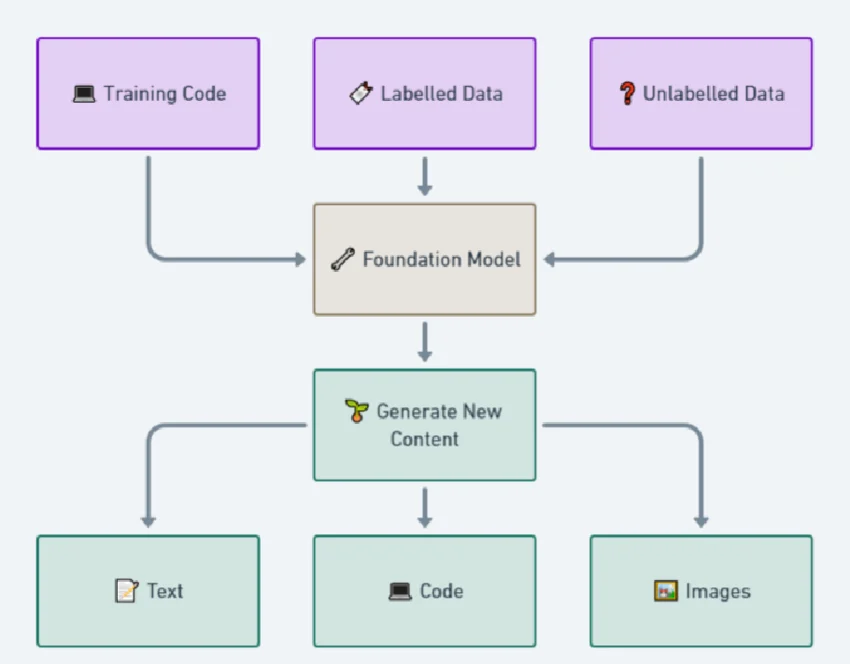
Surveys show how quickly generative tools became standard. For example, a 2023 survey of over 4,000 professionals found that roughly a third of designers were already using AI in their daily workflows.
By 2024, a separate survey of more than 2,000 freelancers found that 61% used generative tools in their work. A large majority expected AI to reshape the design industry, but only about half believed it would improve their own work, and nearly a third had clients who asked them not to use AI at all.
This combination became a defining feature of the early generative era. Designers used models for moodboards and fast style exploration. At the same time, arguments over training data and consent grew louder, leading to strict corporate policies regarding assets.
AI as a pattern in design
By 2025, a number of independent reports converged on a similar picture of AI’s role in design work. Surveys found around 89% of respondents said AI had improved their workflow in some way. Designers described AI as strongest in the early phases rather than in final execution. Platforms like Figma began integrating AI natively to help with these specific early-stage bottlenecks.
AI is routinely used to:
- Overcome blank-page syndrome during ideation.
- Explore multiple layout variations in seconds.
- Draft rough concepting and placeholder copy.
In plain language, people like AI when it feels helpful and low‑friction and avoid it when it feels confusing or risky.
Those findings explain why, even in 2026, AI tends to play the role of assistant rather than owner. Designers are happy to let models propose, summarize, and suggest—but most still want a human to sign off, especially where outcomes matter.

Visual design and the tension between speed and authenticity
Visual designers have arguably felt generative AI most acutely. It touches illustration, photography, iconography, and branding.
Two themes stand out:
- Speed: It is now trivial to produce dozens of visual options for a concept in a single sitting, compressing the “what if” phase dramatically.
- Authenticity: Legal disputes over training data and corporate concerns about IP have pushed many teams to set rules about where AI imagery is allowed.
These constraints force designers to think carefully about where AI genuinely helps. To combat the legal risks, enterprise-safe tools like Adobe Firefly emerged, explicitly trained on licensed content. For low‑stakes illustrations or exploration, AI‑generated images can be ideal. For core branding elements, many teams still prefer commissioned or in‑house work.
AI vs interface design
In interface work, the time between idea and first draft has shrunk. Designers once sketched wireframes by hand, then reproduced them in tools. Now, many start from lightly structured prompts in tools like Relume, v0 by Vercel, or Framer and receive immediate proposals for full layouts.
As work moves closer to implementation, AI’s limitations surface. Aligning a layout with accessibility standards, hitting specific performance budgets, and threading in product strategy demands judgment and domain knowledge.
Designers consistently report a specific division of labor:
- The first 50–60%: AI can quickly generate the foundational structure and basic patterns.
- The final 40%: The nuanced details that actually affect user trust, conversion, and behavior still require deep human craft.
.png)
AI keeps compressing the time cost of “getting something on screen,” which makes understanding what to put on screen more important.
UX and the problem of believable summaries
UX work is where AI’s ability to process language becomes most obvious and most dangerous.
Large language models like ChatGPT and Claude, alongside specialized research repositories like Dovetail, can consume transcripts and return themes, clusters, representative quotes, and suggested insights. Summaries appear in seconds, making repetitive coding tasks less laborious.
There are also obvious risks. Models can overstate patterns that are barely present in the data.
When a system feels like a black box, people are less likely to rely on it.
Good teams respond by treating AI‑based synthesis as a first pass. They use models to point out candidate themes, then verify those themes against raw data.
Current limitations
While AI accelerates output, it introduces systemic risks.
- Homogenization of design: Because models are trained on existing, popular patterns, their outputs naturally regress to the mean. Without deliberate human intervention to break these patterns, products risk looking identical, losing their unique brand differentiation.
- Accessibility and inclusivity blind spots: AI models often fail to account for edge-case user needs. Human experts are required to ensure interfaces remain usable for all demographics, including men, women, the elderly, and those with disabilities.
How this history lands for designers now
For working designers, this history is context for choices teams have to make today.
First, AI is no longer a novelty. Avoiding it is a choice to work slower than peers. The history shows that every time automation enters design, the work that remains becomes more about judgment than execution.
Second, AI consistently excels at:
- generation options
- handling repetition
- summarizing large volumes of material
Third, the parts of design that resist automation look a lot like the parts professionals already care about: deciding which user problems matter.
In practical terms, that suggests a few principles:
- Use AI aggressively in the early phases so more time can be spent on testing and refinement.
- Treat AI‑generated research summaries as hypotheses, not conclusions.
- Be explicit about which parts of the work involve AI and which parts are strictly human decisions.
The history of AI in design is not a story about tools replacing humans; it is a story about tools making the gap between “pixel pushing” and “thinking deeply about the product” wider and more visible.
Sources and further reading
99 designs - Freelance design in the age of AI
Autodesk - 2024 State of Design & Make
Designer Fund & Foundation Capital - State of AI in Design
Herbert A. Simon - The Sciences of the Artificial
McKinsey & Company - The economic potential of generative AI: The next productivity frontier
Nature - Generative AI in digital museum experiences: A study on perceived value and adoption (2025)
Nature - Comparative study of generative AI adoption among design professionals in China and the UK (2026)
Nigel Cross - Designerly Ways of Knowing
UX Tools - 2023 Design Tools Survey
Any statistics cited in this post come from third‑party studies and industry reports conducted under their own methodologies. They are intended to be directional, not guarantees of performance. Real outcomes will depend on your specific market and execution.
How is AI used in design today?
AI is primarily used in the early stages for ideation, layout exploration, and overcoming blank-page syndrome. It helps generate options quickly, leaving the final refinement and strategic decisions to human designers.
Will AI replace human designers?
No. History shows that automation shifts the focus from mechanical execution to strategy and judgment. Designers who understand user needs, edge cases, and business goals remain essential.
What are the biggest risks of using AI in design?
The main risks are the homogenization of design (where everything looks the same), copyright disputes over training data, and accessibility blind spots that fail to account for the diverse needs of men, women, and marginalized groups.
What is generative design?
It is a process where designers set strict constraints and AI algorithms explore thousands of possible physical variations to find the best solutions. It is widely used in CAD and industrial design.