I've been using Claude Design projects since launch week. Before I get into the specifics, I need to put something on the table that frames everything in this article...
We're in the era of good enough design.
Every AI-generated website looks the same. Inter font. Purple-to-blue gradients. Three-column layouts. Rounded corners on everything. Scroll through any "AI redesigned my app" thread on X and try to tell the projects apart.
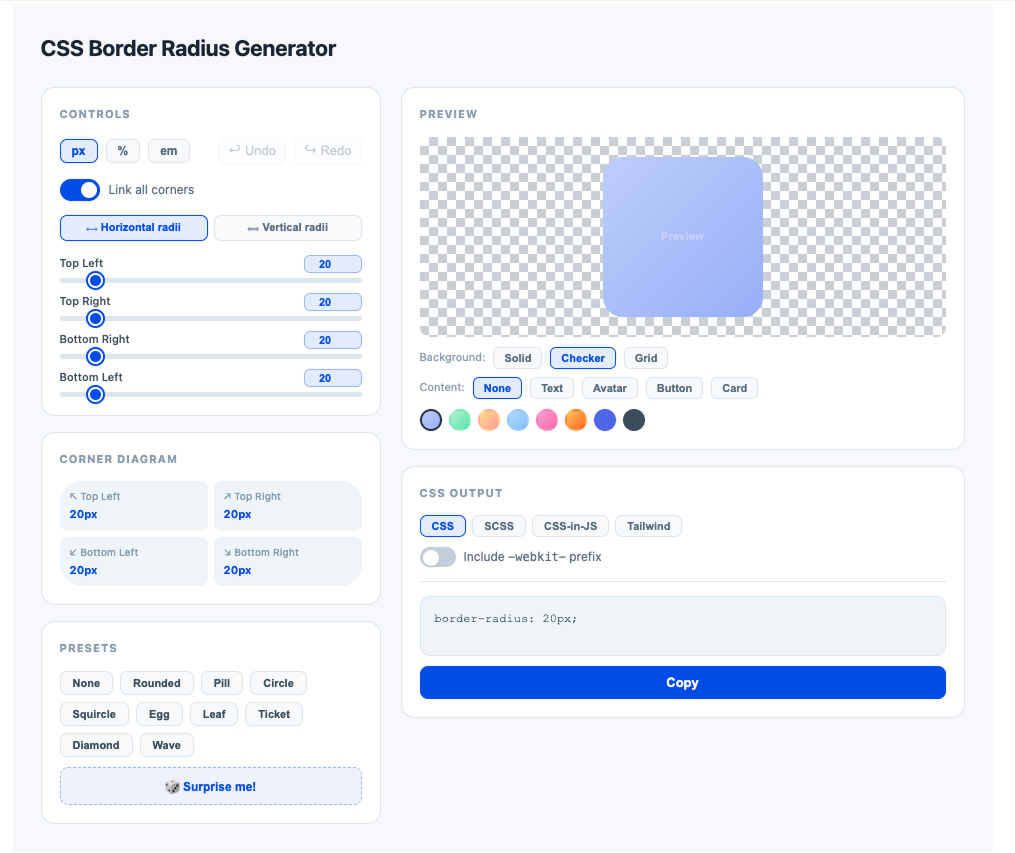
AI doesn't design. It predicts patterns. Ask for "a modern SaaS website" without giving it strong direction and you'll get the most statistically common layout in its training data: hero section, three feature cards, testimonials, pricing table, CTA.
I'm not trashing vibe-coding! If you're a founder with a good idea and no budget for a designer or an engineer, vibe-code it. Make a personal tool that helps you manage your task list or track your expenses. If you have the time and you know how to work with AI, there's zero reason not to. Vibe-coded projects are a genuinely good starting point and I'll defend that position against any designer who says otherwise.
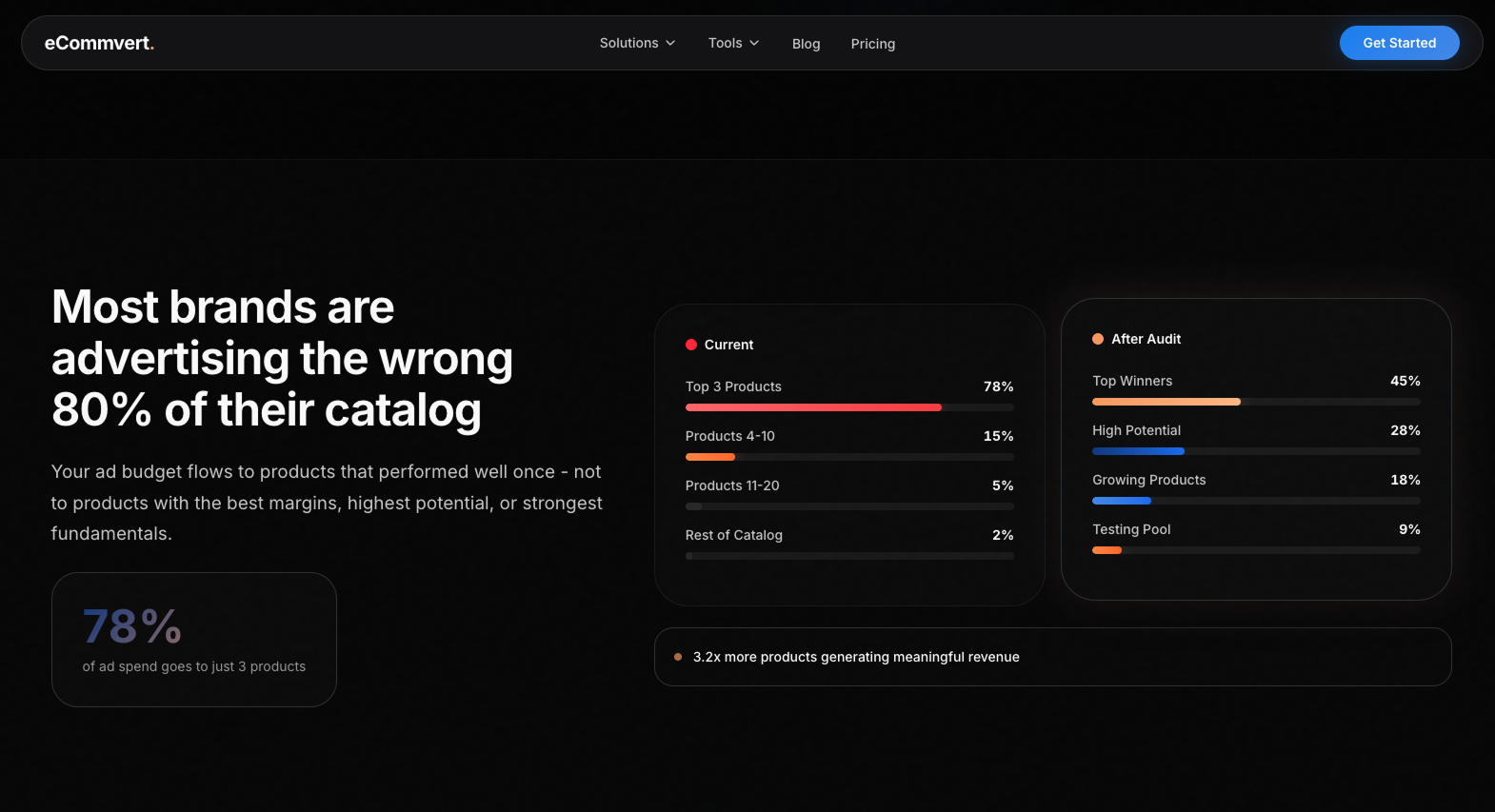
The problem shows up when people try to scale what they vibe-coded:
- no branding
- issues a prototype never had to deal with
- without a strategy in place
- same visuals as any other project
- same component libraries, spacing, border radius
- technical debt from day one
Claude Design fits this picture. A capable tool that produces good-enough output by default. For exploring and prototyping, that's a feature. For shipping to real users at scale, it's a problem. What separates the two is what you do after the first draft.
Claude Design at a glance
Claude Design is a canvas inside Claude.ai. It has the classic AI chat on the left, design on the right, running on Claude Opus 4.7. You describe what you want, Claude builds it, you refine through conversation or by editing directly on the canvas. It produces real code under the hood, not flat images.
You can export or hand off directly to Claude Code for production implementation. That Claude Code handoff is the feature with the most long-term potential.Claude Design is a canvas inside Claude.ai. It has the classic AI chat on the left, design on the right, running on Claude Opus 4.7. You describe what you want, Claude builds it, you refine through conversation or by editing directly on the canvas. It produces real code under the hood, not flat images.
It now has a permanent home in the sidebar on the Claude desktop app and lives at claude.ai/design. The tool launched in April to over 1 million users in its first week, according to Anthropic's June update post.
You can export or hand off directly to Claude Code for production implementation. That Claude Code handoff, which I called the most interesting feature at launch, has gotten significantly more developed since then. More on that below.
If you want the full feature breakdown, Anthropic's launch page covers it.
Anthropic frames the product for two audiences. Their launch page says: "Claude Design gives designers room to explore widely and everyone else a way to produce visual work." The customer quotes back this up. Olivia Xu at Brilliant (a designer) said pages that needed 20+ prompts in other tools took 2 prompts here. Aneesh Kethini at Datadog (a PM) said his team now builds working prototypes before anyone leaves the room.

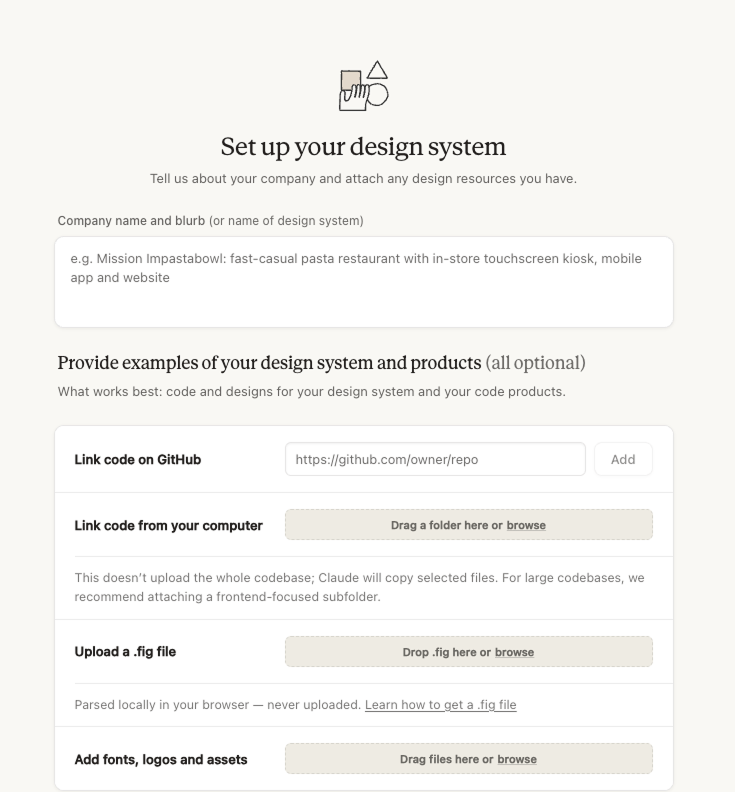
The design system is the entire game
DON'T SKIP THIS STEP...I mean it.
Claude Design's default output is generic. Basic gradients, serif font, blinking status dot, container-on-container layouts. If you don't invest time in your design system, every output screams "I typed one prompt and hit enter."
Here comes the problem though. This tool is strongest for startups and companies that already have a visual identity. If you need to standardize your brand, automate it, scale it across formats — Claude Design can get you there. But you have to feed it everything:
- Social media graphics
- Banners
- Screenshots from the app
- Screenshots of your landing page(s)
- How your blog posts look
- How your featured sections look
Every piece of visual material connected to your brand needs to go in, because Claude needs the full picture before it builds a design system. A logo and a color palette isn't enough. The more you feed it, the closer it gets.
The June update addresses this directly. You can now import your design system from a GitHub repo, design files, or raw uploads. Claude builds with your actual components, validates its output against your system, and corrects before you see the result. Enterprise teams get a new admin role that locks the approved system across the whole org.
This is the right fix for the right problem. The manual setup loop — upload screenshots, describe your brand, fix inconsistencies across sessions — was always going to produce inconsistent results because Claude was approximating your system instead of reading it. Importing from source means the source is the truth.
The editing tools also got more granular. Rich layout controls let you drag, resize, and align elements on the canvas without going back to chat. For designers used to direct manipulation in Figma, that's a meaningful gap closing.
Getting a design system dialed in still takes work. But once it's right, Claude builds from your visual language instead of guessing at it. The upfront cost pays back on every project after.
The token problem
Pro gets a basic weekly allowance. Max gets 5x. The highest tier gets 20x. Those multipliers sound generous until you sit down and work.
At launch, the design system setup was the biggest token sink, and even small fixes cost more than expected. Multiple users reported burning through their entire weekly budget in under an hour.
The June update addressed this directly. Claude Design now shares usage limits with chat, Claude Cowork, and Claude Code — meaning most users will get more headroom and the tokens you burn don't sit in a silo. The average turn now uses fewer tokens to achieve the same results, and Anthropic says errors are down sharply.
Anthropic's team publicly acknowledged users were "hitting usage limits way faster than expected" at launch and called it a top priority. The efficiency work in June is a direct response to that.
The situation is better, but the limits are still real. Weekly allowances are described as "beta-period rate limits subject to change" in Anthropic's pricing docs. Enterprise customers on usage-based plans get a one-time credit covering roughly 20 prompts per user, expiring July 17.
The advice hasn't changed: front-load your token spend on the design system. Get your colors, type, components, and spacing locked before designing real projects. The import-from-GitHub feature makes this faster than it was at launch, so there's less excuse to skip it.
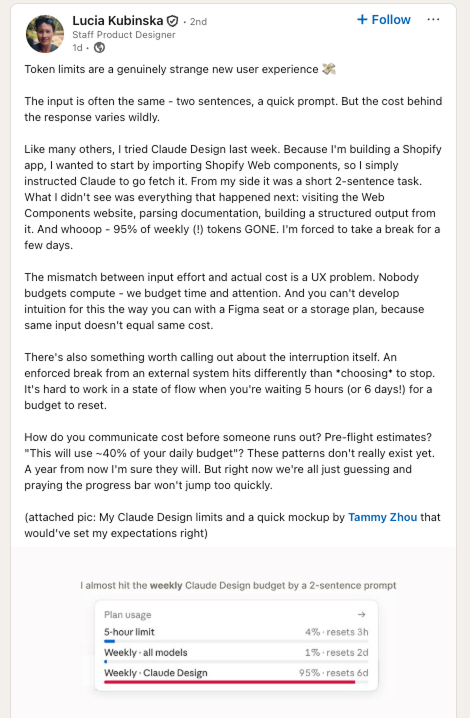
Lucia tried Claude Design for a Shopify app last week. Two sentences in, she asked Claude to import Shopify Web components. From her side, a simple prompt. Behind the scenes, Claude visited the Web Components website, parsed documentation, built structured output from it — 95% of her weekly tokens gone. She called it a UX problem, and she's right. You can't budget time and attention around a tool when the same input doesn't equal the same cost.
The Claude Code connection
I called this "the feature with the most long-term potential" at launch. The June update is the first version where I think that's actually true.
The original handoff was one-directional: finish a design, export it, hand the output to Claude Code. Useful, but it meant every prototype started from a screenshot instead of your real codebase. Claude was guessing at your components.
The new setup flips that. /design-sync in Claude Code pulls your local design system directly into Claude Design, so prototypes start from your actual components. On the other side, /design in Claude Code lets you create and sync design projects from the terminal without touching the canvas at all.
The logic here is sound. The biggest friction in design-to-code workflows has always been drift: the designer works in one abstraction, the engineer in another, and they slowly diverge. A bidirectional sync that keeps both sides reading from the same source should reduce that. Whether it holds up under real team conditions — multiple designers, engineers pushing changes simultaneously — is the question I'd want answered before calling it solved.
Alex Lieberman (co-founder of Morning Brew) described it well in Anthropic's announcement: "The handoff between Claude Design and Claude Code makes the process of prototype to production seamless."
For founders already running Claude Code, this is the integration that was implied at launch. Worth watching closely.
Where Claude Design delivers
This is from my personal experience, and I might be wrong. But slides and basic social media graphics are still the strongest use cases right now. You describe what you need, Claude generates a deck with layouts and content structure, all in HTML. The output inherits your design system, so if you did the setup work, the slides actually look like your brand.
The data connection is where it gets useful fast. Upload a CSV with your quarterly numbers, paste in a data export, describe the metrics. Claude builds slides around that data. When the numbers change, update the source and regenerate.
Basic social media graphics are a strong second. The kind of marketing materials that need to be on-brand and fast, not award-winning. If your design system is set up, Claude produces these at a solid volume. A marketing team that needs 15 social graphics for a launch can get them in one session, token budget permitting.
The June update added native PDF and PowerPoint export, plus direct integrations with Adobe, Canva, Gamma, Lovable, Miro, Replit, Vercel, and Wix. The Gamma connector is the obvious win for slide decks -> design in Claude, push to Gamma for polish, no rebuild. The Canva one makes sense for marketing teams already living there. Replit and Vercel point at the vibe-coding-to-shipping pipeline. I'm less convinced about Miro given Claude Design still has no real-time collaboration -> sending a static design to a collaborative whiteboard feels like a workaround, not a workflow.

UX design isn't there
If you put in the work on your design system, the UI layer can get surprisingly close. Colors, type, components, layouts. Claude Design handles the visual side once it knows your brand. That's the whole point of the design system section above.
UX is a different story. Claude can generate a checkout flow. It can't tell you that this exact pattern killed B2B conversion the last two times you tested it. It can build an onboarding sequence. It doesn't know that your users drop off at step three because the value prop isn't clear until step five. It can lay out a dashboard. It has no idea that the metric your PM stuck in the top left is the one nobody looks at, and the one buried in a tab is the reason customers renew.
UX lives in decisions that come from watching real people use real products. Which screen you show first and why. Where the friction should be on purpose. When to break a flow into two steps and when to collapse it into one. What "simple" means for this specific audience. Claude Design doesn't have access to any of that. It hasn't sat through the user interviews, the support tickets, the analytics reviews, the three failed versions that came before.
The tool also still doesn't support real-time collaboration, public share links, or an infinite canvas for mapping full product flows. Those are scope decisions Anthropic made. Production UX work wasn't the target. Nothing in the June update changes this.
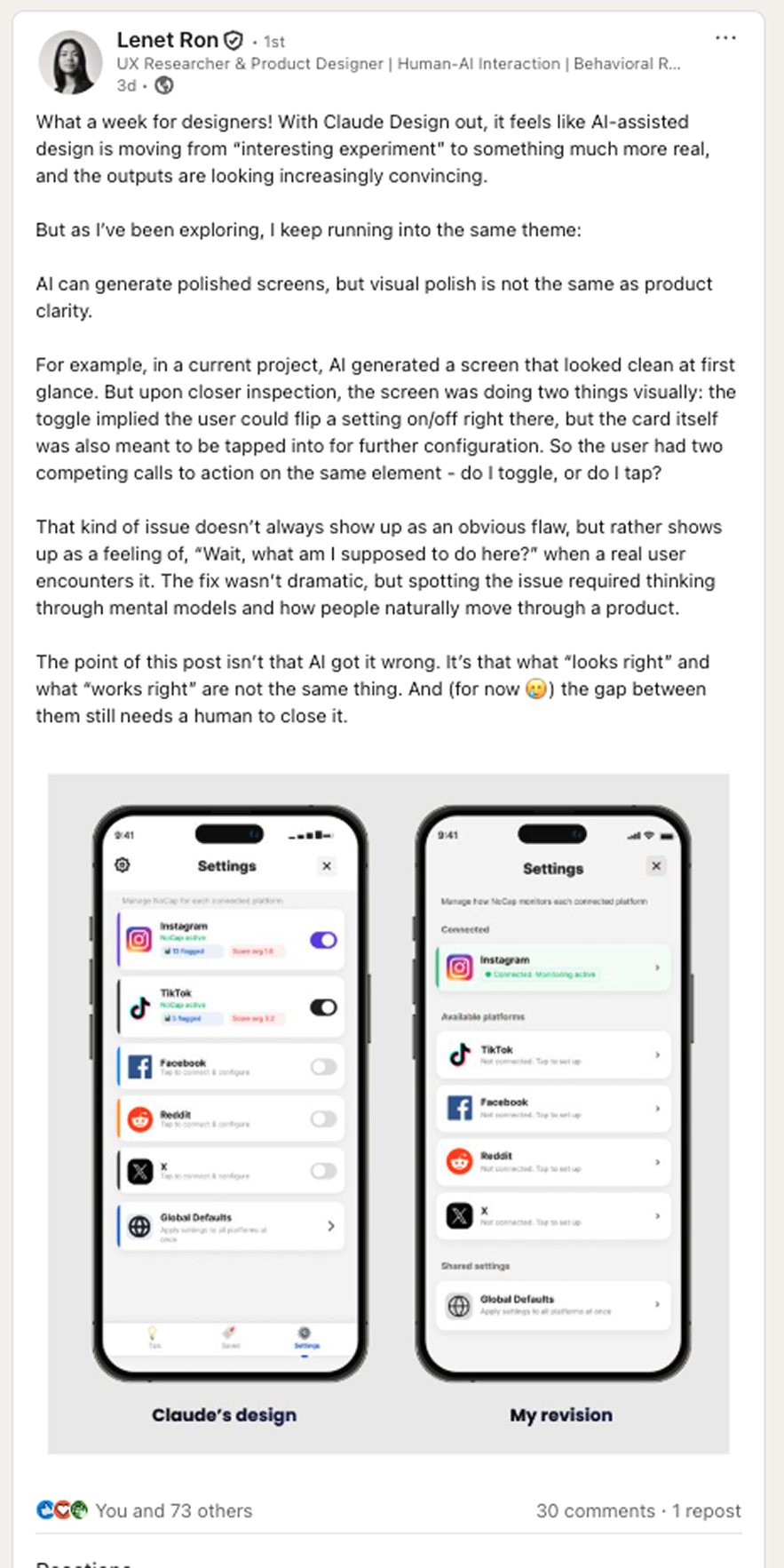
Lenet posted a perfect example of this on LinkedIn: a Claude Design screen that looks polished. Until you notice the toggle and the card are both tappable, doing different things. The kind of conflict a designer catches in two seconds because they've watched users hesitate on screens like this before. AI generated something that passed the eye test. It took a human to see the interaction problem.
What this means if you're a founder
Claude Design is useful. Going from a rough idea to "here's what it could look like" takes minutes. You can walk into a meeting with a visual instead of a description. You can test a pitch deck layout before paying someone to build the real one. The slide integration with your company data alone might justify the $20/month.
The June update is pointed at founders already running Claude Code. The /design-sync command should mean prototypes start from your real codebase instead of a hallucinated approximation of it. That gap was real at launch, and fixing it matters.
The danger is still skipping the designer because the output looks finished. The polish is generic — Claude's defaults, not your brand — unless you did the design system work. And even with a good design system, the output is a prototype. Ship it directly and your users will feel the gaps. Spacing, type, flow, the small things that separate "this looks professional" from "this actually converts."
Use Claude Design to explore faster. Bring in a designer when it's time to ship.
What this means if you're a designer
Ask yourself which part of your job Claude Design threatens. If it's "making layouts from briefs," that part's been getting eaten by AI for a while. Claude Design just does it faster and outputs better code than most competitors.
If your job is understanding problems, running feedback loops, building brand systems, and making judgment calls that depend on knowing the client — you got a faster first draft. That's it.
Figma's value sits in collaboration, design systems, component libraries, version history, and developer handoff with precise measurements. Claude Design has none of that. The tools aren't in the same category yet.
The June update's admin role and design system locking is actually a signal here: Anthropic is building toward enterprise brand governance, not toward replacing the people who set up brand governance. Someone has to define the system that gets locked. That's still a designer.
Claude Design will do to throwaway internal visuals what Canva did to stock graphics. The "I need a pitch deck by Tuesday" work that used to land on junior designer calendars is disappearing. Brand direction, systems thinking, the back-and-forth with clients where design decisions get made — that stays yours.
When average design becomes free, anything with a genuine point of view gets more valuable. I wrote more about this split in my piece on whether AI will replace designers in 2026.
Ask yourself which part of your job Claude Design threatens. If it's "making layouts from briefs," that part's been getting eaten by AI for a while. Claude Design just does it faster and outputs better code than most competitors.
If your job is understanding problems, running feedback loops, building brand systems, and making judgment calls that depend on knowing the client -> you got a faster first draft. That's it.
Figma's value sits in collaboration, design systems, component libraries, version history, and developer handoff with precise measurements. Claude Design has none of that. The tools aren't in the same category yet.
Claude Design will do to throwaway internal visuals what Canva did to stock graphics. The "I need a pitch deck by Tuesday" work that used to land on junior designer calendars is disappearing. Brand direction, systems thinking, the back-and-forth with clients where design decisions get made — that stays yours.
When average design becomes free, anything with a genuine point of view gets more valuable. I wrote more about this split in my piece on whether AI will replace designers in 2026.
Two months in
I called this "a week old" when I first published. Two months of real use changes the read.
The token situation is the most noticeable thing from actual use. The shared limits mean Claude Design doesn't pull from a separate budget. That friction was real and it's mostly gone. Turns are more efficient too, which matters when you're iterating on a design system and every small correction used to cost more than it should have.
The GitHub import is the right call on paper. Bringing your design system in from source instead of approximating it through screenshots should produce more consistent output faster. That's the gap the original version had, and this is the logical fix.
The Claude Code bidirectional sync is the feature I'd want a month with before having a strong opinion. The promise is exactly right: prototypes start from your real components, handoffs don't lose context. Whether it holds up in practice depends on how well it handles teams making changes on both sides at the same time.
The 60/40 split I keep coming back to still holds. Claude Design owns the first 60%: exploration, prototyping, data-driven slides, the "let me see what this could look like" work. That part gets faster every quarter.
The last 40% — taste, client relationships, knowing something is wrong before you can articulate why — stays human. For now.
We're in the era of good enough. Whether you're building your career on the 60% AI is eating or the 40% it can't touch determines how the next few years go for you.
Data sources and references
Anthropic — Introducing Claude Design by Anthropic Labs — https://www.anthropic.com/news/claude-design-anthropic-labs
Claude Help Center — Get started with Claude Design — https://support.claude.com/en/articles/14604416-get-started-with-claude-design
Claude Help Center — Set up your design system in Claude Design — https://support.claude.com/en/articles/14604397-set-up-your-design-system-in-claude-design
Claude Help Center — Claude Design subscription usage and pricing — https://support.claude.com/en/articles/14667344-claude-design-subscription-usage-and-pricing
CNET — Anthropic Introduces Claude Design — https://www.cnet.com/tech/services-and-software/anthropic-introduces-claude-design-first-news/
PCWorld — I tried Claude Design for half an hour. I'm already locked out for a week — https://www.pcworld.com/article/3117811/i-tried-claude-design-for-half-an-hour-im-already-locked-out-for-a-week.html
MindStudio — Anthropic Compute Shortage — https://www.mindstudio.ai/blog/anthropic-compute-shortage-claude-limits
Lucia Kubinska - https://www.linkedin.com/in/luciakubinska/
Lenet Ron - https://www.linkedin.com/in/lenetron/
Any statistics cited in this post come from third‑party studies and industry reports conducted under their own methodologies. They are intended to be directional, not guarantees of performance. Real outcomes will depend on your specific market and execution.
Is Claude Design worth it for a founder with no design background?
Yes, with a caveat. If you put in the work upfront on your design system (now easier with GitHub import), Claude Design produces on-brand output fast. Skip that setup and every output looks like a generic AI prototype. The tool rewards founders who invest the first few hours in brand configuration.
How does Claude Design compare to Figma in 2026?
They're not the same tool. Figma is for production design: collaboration, component libraries, version history, precise developer handoff. Claude Design is for fast exploration and prototyping. The output is real code, not flat images, but it's not a Figma replacement for shipping work.
Does the June 2026 update fix the token problem?
Partially. Claude Design now shares usage limits with chat, Cowork, and Claude Code, and the average turn uses fewer tokens. Users who were burning through weekly budgets in an hour should see a meaningful improvement. The unpredictability issue (same-looking prompts can cost very different amounts) is still there.
What can Claude Design actually export to now?
As of June 2026: PDF, PowerPoint, and direct integrations with Adobe, Canva, Gamma, Lovable, Miro, Replit, Vercel, and Wix. More connectors are coming. The Gamma integration is particularly useful for slide decks that need to go into a polished presentation tool.
Should designers be worried about Claude Design?
The work that's disappearing is the throwaway internal visual work — quick pitch decks, one-off social graphics, rough prototypes. Brand direction, design systems, UX strategy, and client relationship work are not threatened by this. The June admin role feature is actually pointing the other direction: Anthropic is building tools for designers to control what Claude produces, not replace the designers doing the controlling.