
To check whether your website is ready for AI search, test four things: can AI crawlers reach it, does every page state its real address, is the text in the HTML, and do other sites know who you are.
I ran that check on humbldesign.io last week. Crawling was fine. But every one of my 41 blog posts was telling Google that its real address was a page that returned a 404.
I design and build sites in Webflow for a living. If my own site had this, a site your dev team put together over a weekend probably has something like it too.
How I ran the audit
Claude Code ran it, read-only. It fetched all 55 URLs in my sitemap with curl, the way an AI crawler sees them: raw HTML, no JavaScript. Then it compared what each page says about itself with what is true.
Alongside that, I had it research how ChatGPT, Perplexity, Google AI Overviews, AI Mode, Copilot and Claude pick the pages they cite, using studies published through 2026. That part came back as a 7,700-word report. The short version is further down.
You can run the same audit on your own site. Paste this into Claude Code, or any AI tool that can fetch web pages:
Audit https://YOURSITE.com for AI search. Read-only: fetch pages with curl, don't log in and don't change anything.

1. robots.txt: is any search crawler blocked? Check OAI-SearchBot, PerplexityBot, Claude-SearchBot, Googlebot and Bingbot.
2. sitemap.xml: does it list every page and blog post?
3. Canonical tags: on 5 pages, does the canonical URL return 200 and match the page's own address?
4. Raw HTML: is the main text there without JavaScript?
5. Dates: do the visible dates match datePublished and dateModified in the JSON-LD?
6. Identity: what do the homepage, About page and author page say I do? Is it the same everywhere?
7. Internal links: how many blog posts link to another post in the body?
8. Leftovers: placeholder text, empty or wrong page titles, template names.

Report every finding with the URL and the exact markup.
It takes a few minutes and changes nothing.
The bug: every blog post pointed to a 404
A canonical tag is one line in a page's head that tells search engines which URL is the real one. It stops copies of a page from competing with the original, and search engines use it to decide which address to index and show (Google's guide).
My posts live at /blog-posts/post-name. Their canonical tag said /blog/post-name, and that address returns a 404. So all 41 posts were telling Google, Bing and every AI crawler that the real version sat on a page that doesn't exist.
The cause was one hand-written line in the custom code of my Webflow blog template, still pointing at an old URL path:
Before:
<link rel="canonical" href="https://humbldesign.io/blog/{{slug}}">

After:
<link rel="canonical" href="https://humbldesign.io/blog-posts/{{slug}}">
I don't know how long it was there, and I can't tell yet what it cost. Google treats a canonical as a hint, so it may have ignored the broken one and indexed the real URL anyway. May have.
My free audit page had the same problem in a different shape. Its canonical pointed at /about, a page I never built.
The same template held two more leftovers. The share-image tag on every post still said YOUR OG IMAGE URL, and a second share-card tag carried an image link where the card type should be. Those tags decide the preview people see when a post gets shared on LinkedIn or X.
To check your own canonical tags, run these two lines in a terminal. The second one should print 200:
curl -sL https://YOURSITE.com/your-page | grep -o '<link rel="canonical"[^>]*>'
curl -s -o /dev/null -w "%{http_code}\n" PASTE_THE_CANONICAL_URL_HERE
How Claude fixed it through the Webflow MCP
The fix took about ten minutes. Claude read the template's head code through the Webflow MCP, changed /blog/ to /blog-posts/, pointed the audit page at itself and swapped the placeholder for each post's cover image. It touched those lines and left the rest of the template alone.
The careful part came before publishing. Code changes in Webflow only go live with a full site publish, and a full publish also pushes every CMS item marked ready. That week I had five posts lined up. If any of them were queued instead of scheduled, one publish would have released all five at once.
Webflow's help docs say a full publish skips scheduled items. The API can't tell scheduled from queued, so Claude stopped and asked me. They were scheduled. It published, then confirmed the five posts still returned 404 and the new canonical URLs returned 200.
That pause is the habit worth copying. Before any full publish, know what else is waiting to go out. I wrote about the last time an AI edit nearly shipped something broken on this blog, too.
What AI crawlers can see on your site
AI search engines don't all use Google. Each one finds pages through its own index or crawler, and each crawler has its own name in your robots.txt.
| Engine | Finds pages through | Crawler to allow |
|---|---|---|
| Google AI Overviews and AI Mode | Google's search index | Googlebot |
| ChatGPT search | OpenAI's search crawler | OAI-SearchBot |
| Perplexity | Perplexity's own index | PerplexityBot |
| Microsoft Copilot | Bing's index | Bingbot |
| Claude | Anthropic's search crawler | Claude-SearchBot |
Blocking the training crawlers, such as GPTBot, ClaudeBot or Google-Extended, is a separate decision. OpenAI's crawler docs say OAI-SearchBot is the one that decides whether you show up in ChatGPT search answers.
My robots.txt allows everything, and my sitemap lists all 41 posts. That part passed.
JavaScript is the catch. A 2024 study by Vercel found that the crawlers from OpenAI, Anthropic and Perplexity don't run JavaScript. They read the HTML your server sends and nothing else. Webflow sends real HTML, so my posts are readable. My table of contents, though, gets built by a script after the page loads. To those crawlers it's an empty list.
If your site came out of Lovable, Bolt or v0, check this first. Load a page with JavaScript turned off in your browser. Whatever disappears, ChatGPT's crawler probably can't read either.
Dates that tell the wrong story
My posts show a published date and an updated date. The hidden data behind them, the part machines read, said something else. On my hiring guide, the visible date is August 8. The datePublished field said November 15, the last time I republished it.
The template fills that field with the last publish time. The audit found the hidden date disagreed with the visible one on 37 of my 41 posts.
Freshness matters in AI search, and the update date matters more than the publish date. In Seer Interactive's 2026 study, 72% of pages cited by AI engines had been updated within the last year, but only 42% had been published within it. Google asks for the visible date to match the dates in your structured data (Google's guidance), and it lists changing dates without real changes as a warning sign (Google). Mine claimed every post was new each time I fixed a typo.
This one isn't fixed yet. The template has to read the post's own date fields instead of the publish time.
Who is David Pokorny, according to my own site
AI engines don't only cite pages. When someone asks who builds Webflow sites for startups, they name people. To do that, they need a consistent picture of who you are.
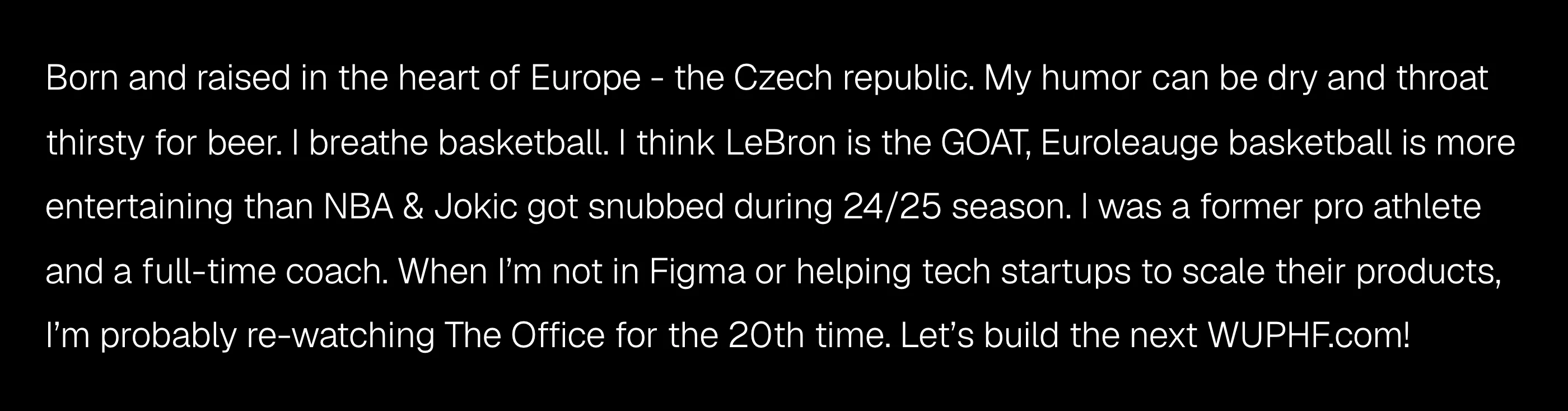
My picture was a mess. The author page was titled "Humbl new", the internal name of the Webflow project. The bio said I breathe basketball and that I'm probably re-watching The Office for the 20th time. It didn't mention Webflow, landing pages, Claude or MCP once. I had no About page. Across the homepage, meta tags, structured data and post bylines, the audit counted at least seven different descriptions of what I do.
The fix is boring: one sentence, used word for word everywhere. Mine is: David Pokorny designs and builds landing pages and marketing sites for seed-stage founders at Humbl Design, in Figma and Webflow, using the Webflow MCP with Claude.
That sentence goes on the author page, the About page, LinkedIn, every directory profile and every byline. Repetition is the point.
Update, November 15: the author page is fixed. It now opens with what I do, it has a real title and description, the byline under every post matches, and its structured data links my LinkedIn, YouTube and X. The basketball and The Office stayed. That part is still true.
Posts that link to nothing
Only 6 of my 41 posts linked to another post in the body. 34 had no link from any other post. Every post showed the same two "related" cards at the bottom, whatever the topic.
Internal links are how a reader, and a crawler, gets from one answer to the next. They also show which pages cover the same subject. From now on, every post I update gets two or three links to related posts, starting with the AI and Webflow guides like how to set up a Webflow project.
What the research says matters for AI search
The research was less exciting than the GEO industry would like. Most of it is correlational and comes from SEO tool vendors, so read the numbers as direction. Four findings held up across studies:
- Answer first. In Surfer's 2026 study of 100,000 AI Overview citations, 38% of the cited text came from the first 100 words of the page.
- Classic search still feeds AI search. AI engines run several searches per question and cite pages that rank for those sub-questions. Only 37.9% of AI Overview citations rank in Google's top 10 for the original query (Ahrefs), so covering the follow-up questions matters more than ranking for one phrase.
- Updated beats new. The Seer numbers above. Keep your best posts current instead of writing new ones on the same topic.
- Length doesn't matter. Across 174,048 pages cited in AI Overviews, the correlation between word count and citation was 0.04, and over half the cited pages were under 1,000 words (Ahrefs).
And three popular tactics that didn't hold up:
- llms.txt. Of 137,210 sites Ahrefs checked, 28% had one, and 97% of those files got zero requests in a month (Ahrefs). Google says Search doesn't use it.
- Extra schema. Adding structured data to 1,885 pages changed AI citations by +2.4% on AI Mode, +2.2% on ChatGPT and -4.6% on AI Overviews, all within noise (Ahrefs).
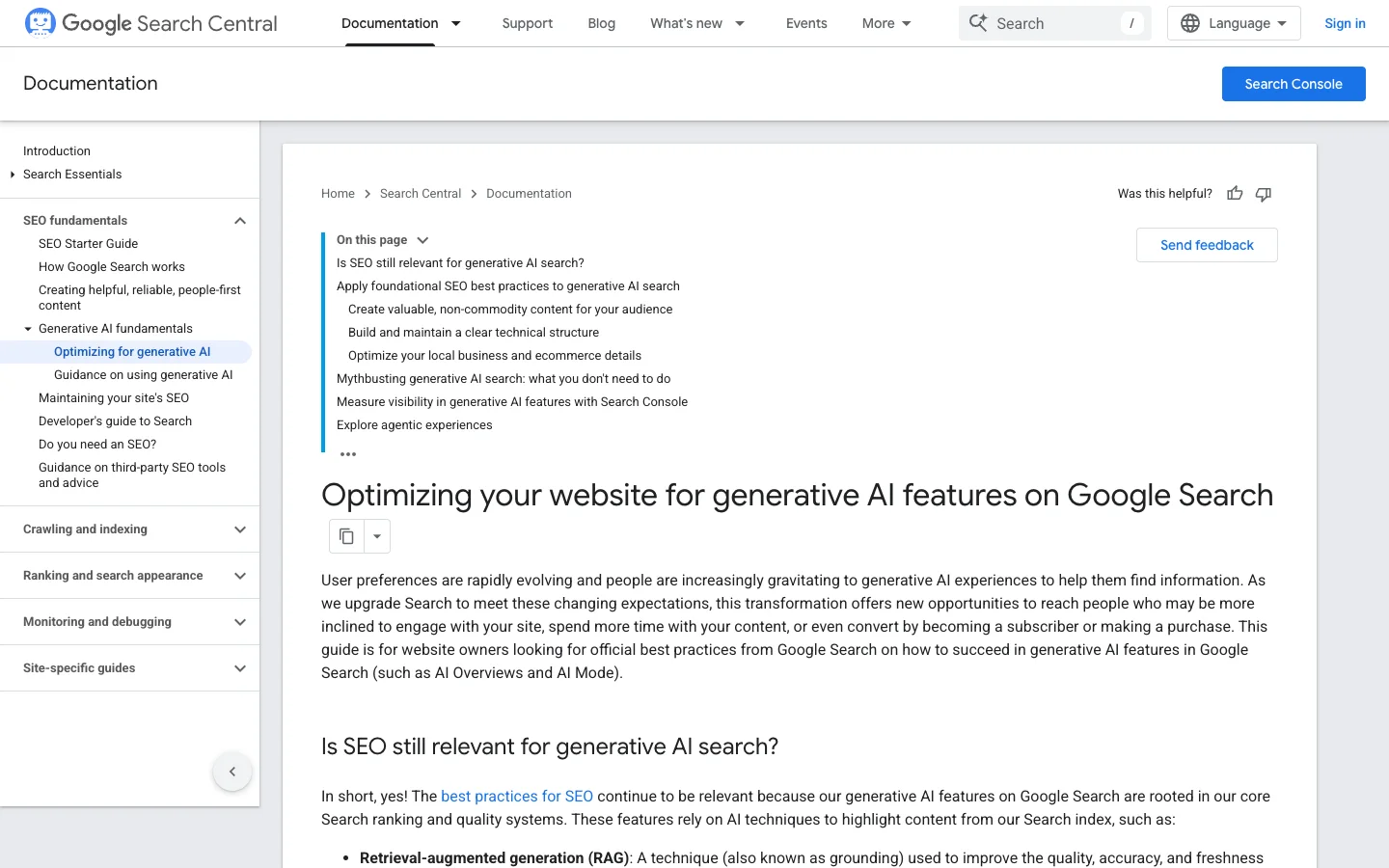
- Tricks aimed at AI. Since May 2026, Google's spam policy names manipulating AI answers as spam (Google).
What gets you named by AI engines
Getting named by AI engines depends mostly on what other sites say about you. In Ahrefs' study of 75,000 brands, the signals most linked to being mentioned in AI answers were YouTube mentions (correlation about 0.74) and mentions on other websites (0.66 to 0.71). Domain Rating managed 0.27 to 0.33. The number of pages on the brand's own site: about 0.19.
For hiring questions, the sources are directories and lists. For design-agency prompts, Clutch was the most cited site on ChatGPT, Copilot, Google AI Mode and Gemini, at 15% of ChatGPT's sources (Temso). I have no Clutch profile and no Webflow directory listing. Both are on the list.
So the blog handles getting cited. Getting named takes LinkedIn, YouTube, directories and clients who say your name in public.
The AI search checklist
Every check from the audit, how to run it, and where my site stands now:
| Check | How to test it | My site |
|---|---|---|
| Crawlers allowed | Read /robots.txt | Passed |
| Sitemap complete | Open /sitemap.xml | Passed, 41 of 41 posts |
| Canonical tags | View source, open the canonical URL | Fixed: all pointed to 404s |
| Text in the HTML | Load the page with JavaScript off | Passed, except the table of contents |
| Dates match | Compare the visible date with datePublished | Open: wrong on 37 of 41 |
| Share previews | LinkedIn Post Inspector | Fixed: placeholder image tag |
| Author and About pages | Read them as a stranger would | Author page fixed, About page still open |
| One description everywhere | Search your name and your studio | In progress: author page and bylines now match |
| Internal links | Count links between posts | Open: 6 of 41 posts |
| Directory listings | Search Clutch and Webflow's directory | Open: none |
What I'm fixing next
The author page is done. Next, in this order: a new About page with the one-sentence description, then the dates in the template, then internal links across the AI and Webflow posts, then a Clutch profile with reviews from real clients.
I'll update this post as each one ships, with the date. If you'd rather have someone run this audit on your site and tell you what to fix first, that's what the free audit is for.
Any statistics cited in this post come from third‑party studies and industry reports conducted under their own methodologies. They are intended to be directional, not guarantees of performance. Real outcomes will depend on your specific market and execution.

How do I know if ChatGPT can see my website?
Check that your robots.txt doesn't block OAI-SearchBot, then load your page with JavaScript turned off. OpenAI's crawlers don't run JavaScript, so text that only appears after scripts run is invisible to them. If the crawler is allowed and the main text is in the raw HTML, ChatGPT search can read the page.
What is a canonical tag and why does it matter for AI search?
A canonical tag is a line in a page's head that names the page's real URL. Search engines use it to decide which address to index and show. Google AI Overviews and AI Mode cite pages from Google's index, so a canonical that points to a missing page can mix up which URL gets indexed and cited.
Do I need an llms.txt file for AI search?
No. Google says its Search doesn't use llms.txt, and an Ahrefs study of 137,210 sites found that 97% of llms.txt files got no requests in a month. Adding one does no harm, but don't expect it to change how often you're cited.
Does schema markup help AI search engines cite my site?
Not measurably. In an Ahrefs test of 1,885 pages, adding schema changed AI citations by a few percent in either direction, within noise. Keep your schema accurate for classic search features, but don't treat it as an AI-search lever.
What matters most to get recommended by AI search engines?
Mentions on other sites. In Ahrefs' study of 75,000 brands, YouTube mentions and mentions across the web tracked AI visibility far more closely than backlinks or the size of the brand's own site. For hiring questions, directories like Clutch are among the most cited sources.