Move your vibe-coded site to Webflow when someone other than the person who prompted it needs to edit it, when you publish content every week, or when the site has to stop looking like every other Lovable page. If it's one page, no one else touches it and it does its job, keep it where it is.
I design landing pages and marketing sites for seed-stage founders in Figma and build them in Webflow, and moving vibe-coded sites to Webflow is one of the things I do. Below is how I decide, what moves, what it costs and the steps, as of November 2026.
When to move a vibe-coded site to Webflow
A vibe-coded site is worth moving to Webflow once the site has more than one job: marketing pages, a blog, case studies, people outside the dev team editing it. Lovable, v0 and Bolt are good at getting a first version live. They get awkward when a marketer needs to change a headline at 6pm without opening a prompt box.
These are the signals I look at:
| Signal | Keep it where it is | Move it to Webflow |
|---|---|---|
| Who edits the site | Only the founder who built it | Marketing, sales or a contractor |
| Content | One page that rarely changes | A blog, case studies, a changelog, job posts |
| Design | Fine for a waitlist or a demo | Looks like the default template you started from |
| Where the product lives | The site is the product | The site markets a product that lives somewhere else |
| Traffic | Friends, a launch post, a few hundred visits | Paid ads, investors, search traffic you want to grow |
Two or more answers in the right column and I'd move. One answer and you can wait.
When to keep it where it is
Keep a vibe-coded site where it is if it's a waitlist, a one-page demo or a site you'll throw away after a raise. Moving costs money and attention, and a seed-stage founder has better places for both.
Also keep it if the marketing pages and the app are tangled together in one codebase and you can't split them yet. Fix that first. Webflow hosts the marketing site; it doesn't host your app.
What moves and what stays
Moving a vibe-coded site to Webflow moves the marketing site only. The app, the logins and the database stay in Lovable, v0, Bolt or wherever your code lives, usually on a subdomain like app.yourcompany.com, while Webflow serves yourcompany.com.
The move has three parts:
- Content moves as-is: page copy, blog posts, case studies, images, page titles and meta descriptions.
- URLs move or get redirected: keep the same paths where you can, and set a 301 redirect in Webflow for every one that changes.
- The design gets redone: this is the part I'd never copy over. AI builders produce the most common startup layout because that's what they've seen most. Your vibe-coded site has a thousand twins, and a move is the cheapest moment to fix that.
Is a Lovable site bad for SEO?
A Lovable site is no longer invisible to search engines, so SEO alone isn't a reason to move. Lovable's docs say apps created from May 13, 2026 use server-side rendering, and older React and Vite apps serve pre-rendered pages to verified search and AI crawlers. The same page says Lovable doesn't always create a sitemap and that the starting metadata is generic.
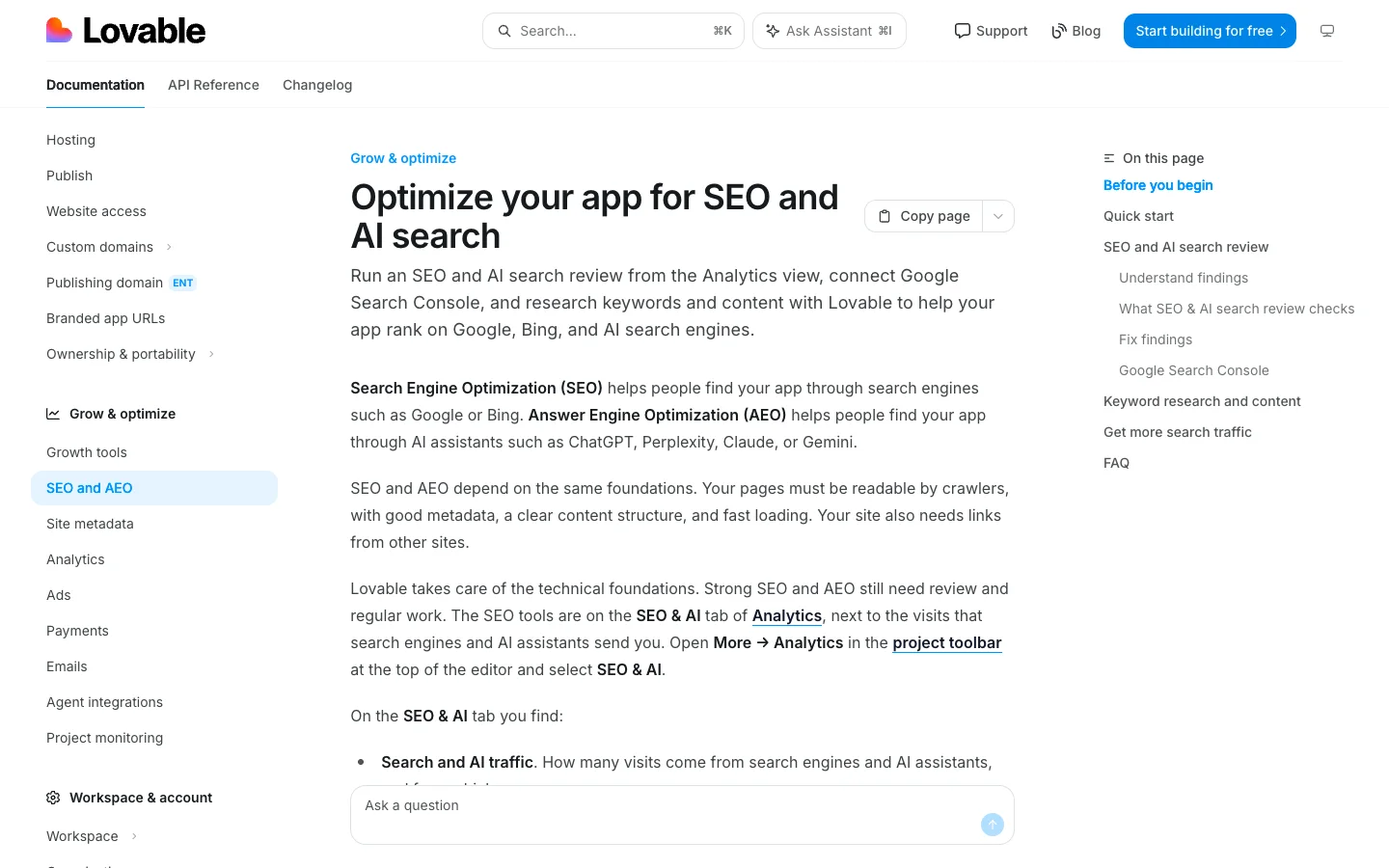
The real gap is content. Lovable's docs describe inline text edits and a database editor, and no CMS for blog posts or case studies. When Lovable imports a site, blog posts come in as fixed page text. Webflow's CMS is built for exactly that content: on the Premium plan you get 20,000 CMS items and 40 collections, and each item gets its own SEO title and description fields.
How to move a vibe-coded site to Webflow
Moving a vibe-coded site to Webflow takes six steps, and the design step is the one to protect from shortcuts.
- Inventory every URL. List each page and post with its path, title, meta description and Open Graph image. This list drives the redirects later.
- Design the new site in Figma. Start from what the site has to do for your buyer, not from the current layout. Write the brand rules into a DESIGN.md file while you're at it.
- Set up Webflow before any page. Variables, base styles, class naming and the CMS collections. I covered this in how to set up a Webflow project.
- Build the pages and fill the CMS. Pages get built from the Figma design. Blog posts and case studies go into CMS collections, which Claude can fill through the Webflow MCP.
- Redirect and rewire. Add a 301 redirect for every changed URL, reconnect forms to wherever leads go, and copy over analytics and any tracking scripts.
- Switch the domain and check the live site. Point the root domain at Webflow, keep the app on its subdomain, then open every URL from step 1 and confirm it loads or redirects.
For step 1, if your code is synced to GitHub, ask the AI that built the site to write the inventory for you. This is the prompt I'd use:
List every public page and blog post on this site as a CSV with these columns:
path, page title, meta description, og:image URL, H1, word count, links to the app (yes/no).
Include pages that are only reachable from the footer.
Don't change any code. Save the file as url-inventory.csv.
Can Claude move the site for you?
Claude can do the content half of a Webflow move. Through the Webflow MCP server it creates CMS collections and fields, adds blog posts in bulk, writes SEO titles and descriptions, and builds sections from a clear description. I use it on my own site: in one session it fact-checked and updated 16 blog posts. The setup is in how to connect Claude to Webflow with MCP.
Claude can't decide what the new site should look like or check whether a page feels right on a phone. If you point it at the old site and say "rebuild this in Webflow", you get the same generic design on a new host. The whole build, from Figma to the CMS, is in how I design and build a Webflow site with Claude.
What moving to Webflow costs
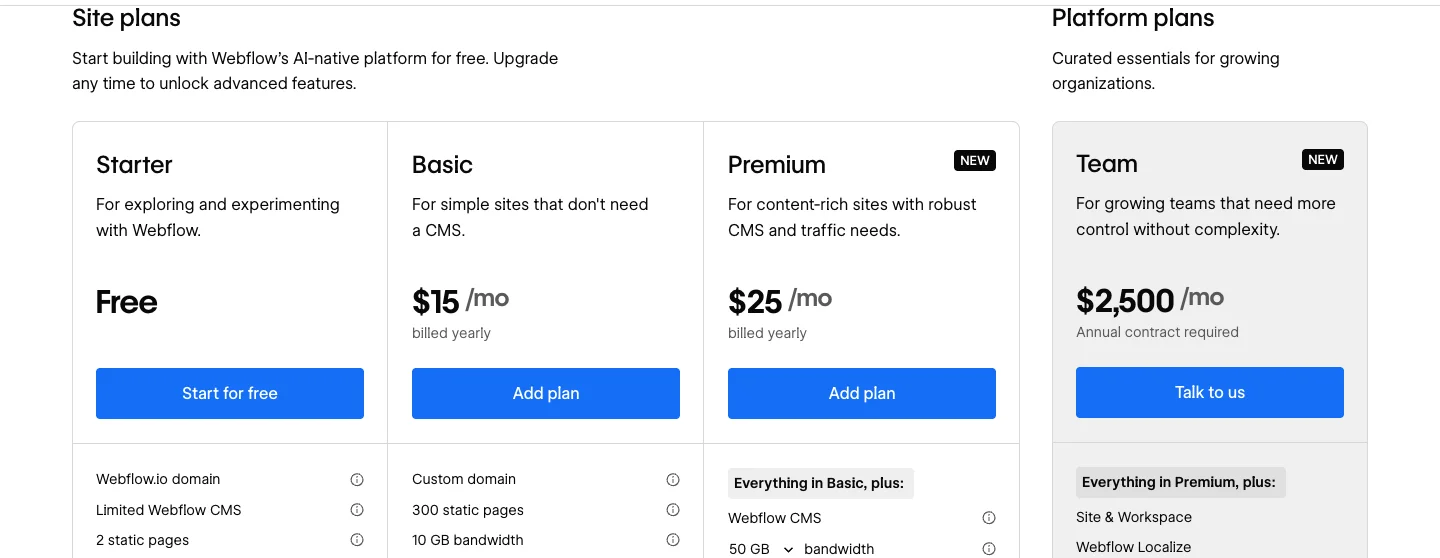
Moving a vibe-coded site to Webflow costs a Webflow plan plus the design and build work. As of November 2026, Webflow's Premium plan is $25 a month billed yearly or $39 monthly, and it's the plan you need for a blog or case studies. Basic, at $15 a month billed yearly, has no CMS. The Webflow MCP is free on every plan.
You keep paying for your AI builder if the app stays there. The design and build is the bigger number, and what I charge for it is listed in the cost section of the Webflow and Claude guide linked above.
Check security before you move
A move to Webflow fixes the marketing site and leaves the app's security exactly where it was. In February 2026 The Register reported a researcher finding 16 vulnerabilities, 6 critical, in one Lovable-hosted app that exposed data on more than 18,000 users. Lovable's changelog shows a security review before publishing added on November 12, 2026, and since November 18 it can block publishing when it finds a critical issue, if that setting is on.
I flag what I see on a vibe-coded site and point founders to someone who fixes security for a living. I don't fix it myself.
Start with the inventory prompt above. If the CSV has more than 10 rows and three of them are blog posts, you've outgrown the builder you started in.
Any statistics cited in this post come from third‑party studies and industry reports conducted under their own methodologies. They are intended to be directional, not guarantees of performance. Real outcomes will depend on your specific market and execution.

Can I keep my app in Lovable and move only the marketing site to Webflow?
Yes. Most founders keep the app, logins and database in Lovable, v0 or Bolt on a subdomain like app.yourcompany.com, and move the marketing site to Webflow on the root domain. Webflow hosts the marketing pages and the CMS. It doesn't host your app.
Will I lose my Google rankings if I move my site to Webflow?
You keep your rankings if you keep the URLs or redirect them. Inventory every page and post before the move, keep the same paths where you can, and add a 301 redirect in Webflow for every URL that changes. Then check each old URL on the live site after the switch.
Does Lovable have a CMS for blog posts?
No. As of November 2026, Lovable's docs describe inline text edits and a database editor, and no CMS for blog posts or case studies. When Lovable imports a site, blog posts come in as fixed page text. Webflow's Premium plan includes a CMS with 20,000 items and 40 collections.
Can Claude move my vibe-coded site to Webflow?
Claude can move the content. Through the Webflow MCP server it creates CMS collections, adds posts in bulk, writes SEO fields and builds sections from a description. Claude can't redesign the site well on its own, so the design still needs to come from Figma and a person who knows your buyer.
How much does Webflow cost for a startup site?
Webflow's Premium plan, the one you need for a blog or case studies, costs $25 a month billed yearly or $39 monthly as of November 2026. Basic costs $15 a month billed yearly and has no CMS. The Webflow MCP server is free on every plan.